

Intro:

Module 1:





Module 2:




Module 3:



Module 4:



Instructions for Extracting and Running IMI Zip Files
Please follow the instructions below for extracting and running downloaded IMI Zip files. Contact us at this email if you have any questions.
- Step 1: Download the zip file
from the link in the product card.
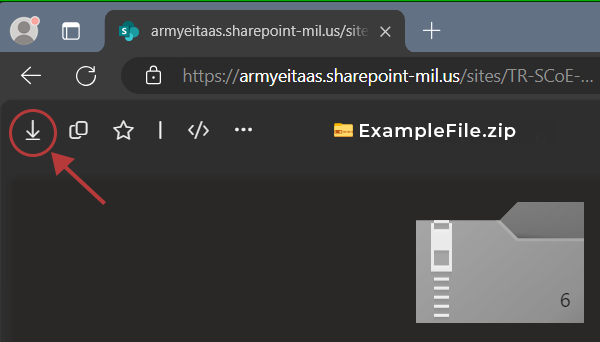
Note: for SharePoint downloads,
you'll find a download button in the top-left corner on the
SharePoint page, as shown below.
- Step 2: Locate the
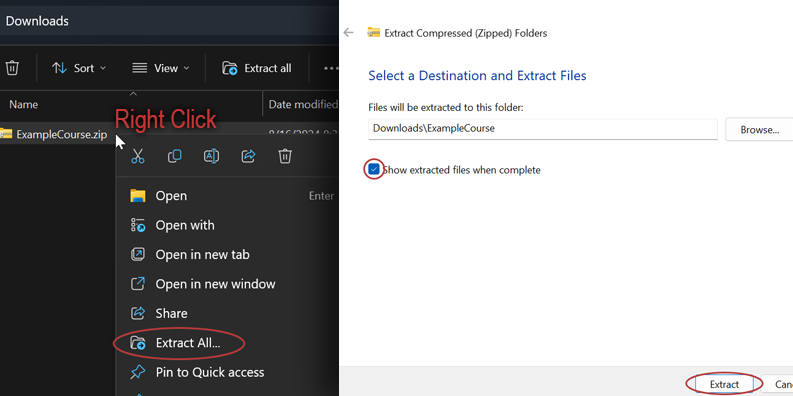
downloaded zip file on your computer. Right-click on the zip and
select "Extract All" from the dropdown menu. A new window
appears. Ensure "Show extracted files when complete" is checked.
Click "Extract."
- Step 3: The
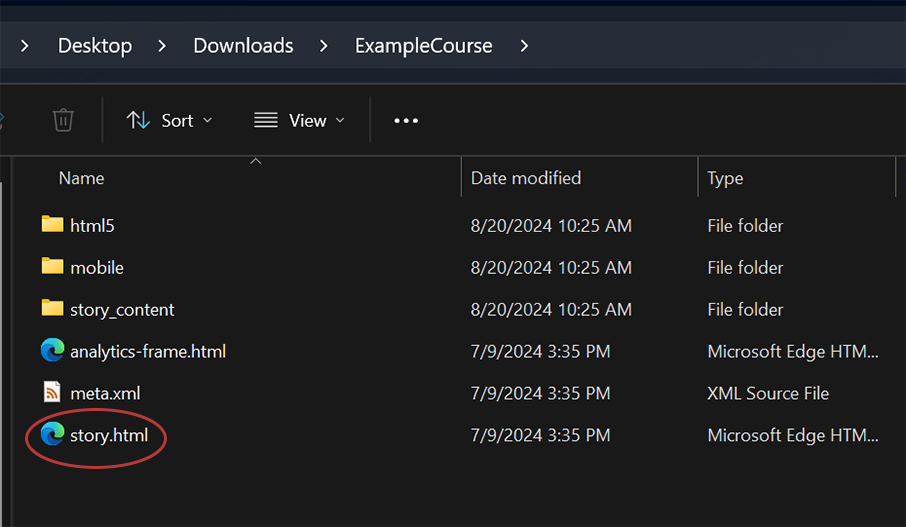
extracted folder will open. Double-click the "story" file
to view the IMI.
Click the link below to download the product:
Download Zip FileClick the link below to stream the product:
Stream OnlineClick the link below to access the files:
Click HereClick one of the following:
Click one of the following: