
Instructions for Downloading and Running IMI Products
Please follow the directions below run
Interactive Multimedia Instruciton (IMI) Zip Download files on a desktop or laptop computer. If you
have any issues after following these directions, please contact the CASCOM Training Technology
Division via the Army Sustainment Resource Portal email: usarmy.lee.cascom.mbx.asrp@army.mil
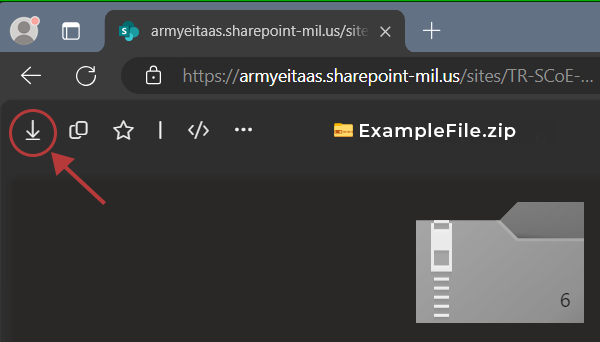
- Step 1: Download the zip file
from the link in the product card. Note: for
SharePoint downloads, you'll find a download button in the top-left corner
on the SharePoint page, as shown below.
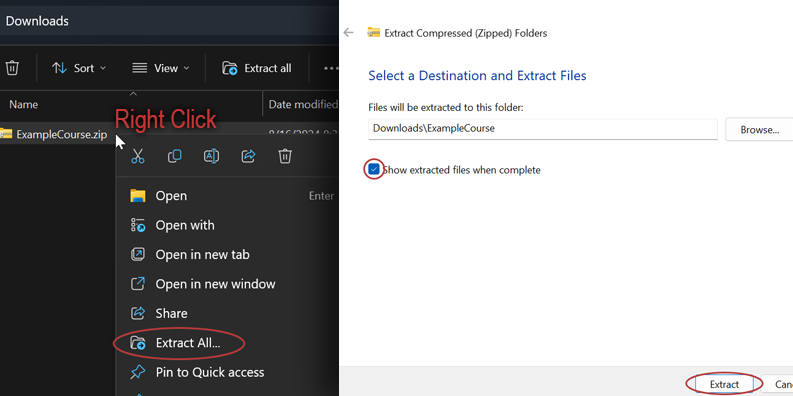
- Step 2: Locate the
downloaded zip file on your computer. Right-click on the zip and
select "Extract All" from the dropdown menu. A new window
appears. Ensure "Show extracted files when complete" is checked.
Click "Extract."
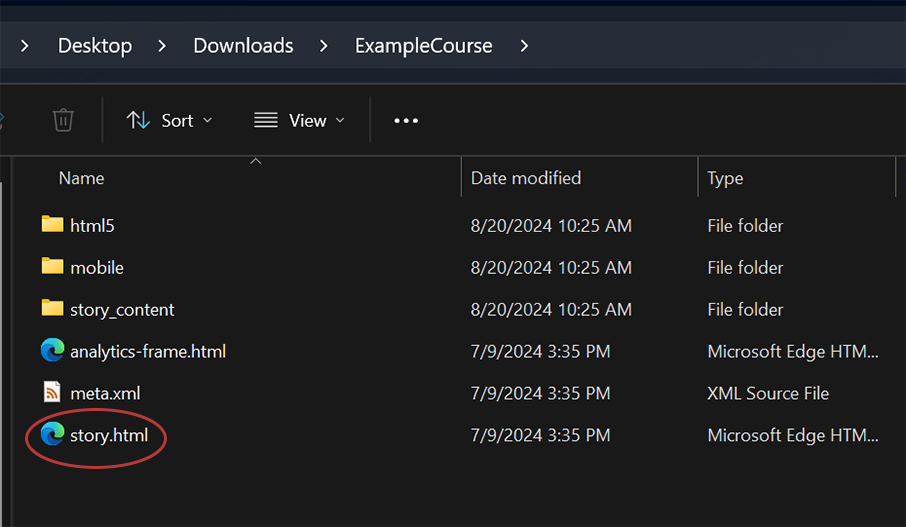
- Step 3: The extraced
folder will open. Double-click the "story" (or in some cases
"index") file to view the IMI.